


Email Subscription ye widget aapke Visitors ko aapke Blog Post ki Latest Update Email ke zariye bhejta hai. Jaise he aap apne Blog par Koi New Post Publish karte ho to iss Widget ke madhyam se wo Post aapke Visitors tak email dwara automatically send ho jaati hai. Iss widget se aapke blog ko bahut accha fayda milega.

ab neeche me aapke sath kuch Acche Design ke Email Subscription widget de raha hu aapko bas uss widget ka code copy karna hai aur iss post ke last me jo steps honge unko follow karna hai. to isliye post ko last tak padhiye.

Code-:

Code-:

Code-:
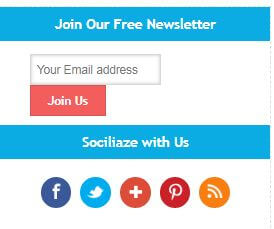
Code-:

Code-:
1. Sabse Pehle aapko apne Blogger Layout Me jaana hai.
2. Waha par "Add a gadget" par click kijiye aur "html/javascript" ko select kijiye.
3. ab aapko apna widget code waha par paste kar dena hai jo aapne upar se copy kiya hai.
Code Me Kya Changes Karne hai
*Sabse Pehla change aapko ye karna hai ki jaha par bhi aapke widget code me aapko [Your Blog uri] dekhne ko milega waha par aapko apna feedburner link daal dena hai. feedburner link aapko https://feedburner.google.com yaha par visit karke mil jaayega to usse copy karke apne widget code me paste kar dijiye [Your Blog uri] ki jagah par.
* aapke code me jaha par aapko [Fb url] dekhne ko milega waha par aapko apne facebook page ka link paste karna hai.
* apne widget me jaha par aapko [Twitter url] aur [Google+ url] dekhne ko milega waha par aapko apna Twitter aur Google Plus link paste kar dena hai.
* [RSS url] ki jagah par bhi aapko apna feedburner link daal dena hai.
* [Pinterest url] [Twitter Username] [Fb Page Name] in sabhi ko hata ke apne khud ke social media links ko waha par paste kar dijiye.
* ab "save" par click kijiye.
bas aapka widget ab poori tarah se add ho chuka hai.
Thank You-:
Thanks to howbloggerz and codiblog. Jinenhe ye code design kiya hai. Thank you Very Much
WordPress par free blog Kaise banaye
Blog Post ko Google Index Kaise Kare
Google Adsense Account Me Apna Bank Account Kaise Add Kare
Blogger Blog ke liye Top 5 Responsive Templates
Blogger Blog Me Facebook Page Widget Kaise Add Kare
to dosto aaj humne sikha ki apne Blogger Blog me Email Subscription Widget kaise add karte hai. Ye post kaisi lagi aap hume neeche comment karke bata sakte hai aur iss post ko apne dosto ke sath bhi share kijiye. Dhanyawad!

Email Subscription Widget Add Karne ke Fayde kya hai
iska ek he aur bahut important fayda ye hai ki aapke Visitors aapke Blog ke sath humesha connect rahenge. TO iski wajah se aapke Blog par accha sa traffic aapko milta rahega. Aapne Bahut saare Professional Bloggers ko dekha hoga wo humesha apne blog me Email Subscription WIdget zaroor add karte hai taaki unke sabhi Visitors unse connect rahe.ab neeche me aapke sath kuch Acche Design ke Email Subscription widget de raha hu aapko bas uss widget ka code copy karna hai aur iss post ke last me jo steps honge unko follow karna hai. to isliye post ko last tak padhiye.
Top 5 Email Subscription Widgets for Blogger
Code-:
<style type="text/css">
.jhmsub {
background-color: rgb(87, 98, 105);
width: 100%;
height: 100%;
padding: 5px;
box-shadow: 0px 0px 5px rgb(87, 98, 105);
}
.jhmform-inner {
text-align: center;
color: rgb(255, 255, 255);
font: bold 16px "trebuchet MS","Tahoma";
}
.jhmemailform {
width: 240px;
margin: 10px auto;
}
#jhmemailbox {
background-color: #798187;
color: #FFF;
width: 208px;
border: 1px solid #697780;
padding: 15px;
text-align: center;
height: 18px;
box-sizing: content-box;
}
#jhmemailbutton {
background-color: rgb(243, 93, 92);
border: 1px solid rgb(215, 84, 83);
color: rgb(255, 255, 255);
width: 240px;
font: bold 16px "trebuchet MS","Tahoma";
padding: 15px;
text-align: center;
height: 50px;
margin: 10px auto;
cursor: pointer;
}
#jhmemailbutton:hover {
background-color: #E64C4B;
border: 1px solid #BF4A49;
}
.jhmsignup-form {
margin-top: 15px;
}
.jhmsocial-icons {
overflow: hidden;
text-align: center;
border-bottom: 1px solid rgb(133, 133, 133);
width: 230px;
display: block;
margin: 20px auto;
}
.jhmsocial-icons ul {
margin: 0px auto !important;
text-align: center;
padding: 0px !important;
display: inline-block;
}
.jhmsocial-icons ul li {
background: transparent none repeat scroll 0% 0% !important;
border: medium none !important;
float: left;
list-style-type: none !important;
padding: 0px !important;
margin: 0px 2px !important;
}
.jhmsocial-icons ul li::before,
.jhmsocial-icons ul li::after {
display: none !important;
}
.jhmsocial-icons ul li a, .jhmsocial-icons ul li a:hover {
background: url("https://blogger.googleusercontent.com/img/b/R29vZ2xl/AVvXsEi0U_yPFIdxXh2zgVCD8MjnHqw1_ZBc4GkV9mS7c-7DcsWjs-C2DQusoa2_X7dVbO0SR7tK7uZhTTii91AZOPrec4qu2JEztwvnFTpspBaYAf92trTU3eA9_BgxSrylDKcvuTqYMqroOL4n/s1600/sprite_32x32.png") no-repeat scroll 0 0;
-moz-border-radius: 50%;
-webkit-border-radius: 50%;
border-radius: 50%;
display: block;
height: 34px;
overflow: hidden;
text-indent: -999px;
transition: all 0.25s linear 0s;
width: 34px;
}
.jhmsocial-icons ul li.social-facebook a {
background-position: -62px 1px;
}
.jhmsocial-icons ul li.social-facebook a:hover {
background-color: #3b5998;
}
.jhmsocial-icons ul li.social-twitter a {
background-position: -254px 1px;
}
.jhmsocial-icons ul li.social-twitter a:hover {
background-color: #00aced;
}
.jhmsocial-icons ul li.social-gplus a {
background-position: -95px 0px;
}
.jhmsocial-icons ul li.social-gplus a:hover {
background-color: #dd4b39;
}
.jhmsocial-icons ul li.social-pinterest a {
background-position: -159px 1px;
}
.jhmsocial-icons ul li.social-pinterest a:hover {
background-color: #cb2027;
}
.jhmsocial-icons ul li.social-rss a {
background-position: -190px 0px;
}
.jhmsocial-icons ul li.social-rss a:hover {
background-color: #F87E12;
}
</style>
<div class="jhmsub">
<div class="jhmsocial-icons">
<ul>
<li class="social-facebook"><a href="[Fb url]" target="_blank" title="Facebook">Facebook</a></li>
<li class="social-twitter"><a href="[Twitter url]" target="_blank" title="Twitter">Twitter</a></li>
<li class="social-gplus"><a href="[Google+ url]" target="_blank" title="Google+">Google+</a></li>
<li class="social-pinterest"><a href="[Pinterest url]" target="_blank" title="Pinterest">Pinterest</a></li>
<li class="social-rss"><a href="[RSS url]" target="_blank" title="RSS">RSS</a></li>
</ul>
</div>
<div class='jhmsignup-form'>
<div class='jhmform-inner'>
<h4>Subscribe to my Newsletter</h4>
</div>
<div class='jhmemailform'>
<form action='http://feedburner.google.com/fb/a/mailverify' id='subscribe' method='post' onsubmit='window.open('http://feedburner.google.com/fb/a/mailverify?uri=[Your Blog uri]', 'popupwindow', 'scrollbars=yes,width=550,height=520');return true' target='popupwindow'>
<input name='uri' type='hidden' value='[Your Blog uri]'/>
<input name='loc' type='hidden' value='en_US'/>
<input id='jhmemailbox' name='email' required='' type='text' placeholder='Your Email'/>
<input id='jhmemailbutton' title='' type='submit' value='Subscribe'/>
</form>
</div>
</div>
</div>
Code-:
<style type="text/css">
.jhmsignup-form {
background: transparent url("https://blogger.googleusercontent.com/img/b/R29vZ2xl/AVvXsEgJ8Dw0X3aXo9j6_LdJQ0RZOAxyA7OV0Nu7QaL0fb0MYNil9w4XtsMEg9mAqD3WH-Noenvk2rj7iUBWXbIDaD6-G1F1D2YVKbgbbQS7xh9Omk3dm1L1mXotRR-u1LdPdS-lmaORQ3UDca5b/s1600/Email-bg.jpg") no-repeat scroll center center / 250px 150px;
height: 150px;
width: 250px;
margin: 10px auto 60px auto;
}
.jhmform-inner p {
text-align: center;
color: #fff;
padding: 10px;
font: bold 18px "trebuchet MS","Tahoma";
}
.jhmemailform {
margin: 120px auto 5px;
width: 215px;
}
#jhmemailbox {
background: #FEFEFE none repeat scroll 0% 0%;
border: medium none;
font: 12px/12px "HelveticaNeue",Helvetica,Arial,sans-serif;
margin-right: 5px;
box-shadow: 0px 0px 4px rgb(207, 207, 207) inset, 1px 1px 1px rgb(186, 186, 186);
padding: 7px;
box-sizing: content-box;
height: 12px;
vertical-align: top;
display: inline-block;
}
#jhmemailbutton {
background: transparent linear-gradient(to bottom, rgb(202, 48, 40) 0%, rgb(235, 88, 78) 100%) repeat scroll 0% 0%;
box-shadow: 0px 0px 2px rgb(182, 37, 32) inset;
border: medium none;
color: #FFF;
cursor: pointer;
font: 13px/13px "HelveticaNeue",Helvetica,Arial,sans-serif;
padding: 6px;
border-radius: 5px;
height: 27px;
display: inline-block;
}
#jhmemailbutton:hover {
background: transparent linear-gradient(to bottom, #CA3028 0%, #B72420 100%) repeat scroll 0% 0%;
}
.jhmsocial-icons {
margin: 20px 0 0;
overflow: hidden;
display: block;
text-align: center;
}
.jhmsocial-icons ul {
display: inline-block;
margin: 0 auto !important;
text-align: center;
padding: 0px
}
.jhmsocial-icons ul li {
background: transparent !important;
border: none !important;
float: left;
list-style-type: none !important;
margin: 0 4px 10px !important;
padding: 0 !important;
}
.jhmsocial-icons ul li::before,
.jhmsocial-icons ul li::after {
display: none !important;
}
.jhmsocial-icons ul li a, .jhmsocial-icons ul li a:hover {
background: url("https://blogger.googleusercontent.com/img/b/R29vZ2xl/AVvXsEi0U_yPFIdxXh2zgVCD8MjnHqw1_ZBc4GkV9mS7c-7DcsWjs-C2DQusoa2_X7dVbO0SR7tK7uZhTTii91AZOPrec4qu2JEztwvnFTpspBaYAf92trTU3eA9_BgxSrylDKcvuTqYMqroOL4n/s1600/sprite_32x32.png") no-repeat scroll 0 0;
-moz-border-radius: 50%;
-webkit-border-radius: 50%;
border-radius: 50%;
display: block;
height: 38px;
overflow: hidden;
text-indent: -999px;
transition: all 0.25s linear 0s; width: 38px;
}
.jhmsocial-icons ul li.social-facebook a {
background-color: #3b5998;
background-position: -60px 3px;
}
.jhmsocial-icons ul li.social-twitter a {
background-color: #00aced;
background-position: -253px 3px;
}
.jhmsocial-icons ul li.social-gplus a {
background-color: #dd4b39;
background-position: -93px 3px;
}
.jhmsocial-icons ul li.social-pinterest a {
background-color: #cb2027;
background-position: -157px 3px;
}
.jhmsocial-icons ul li.social-rss a {
background-color: #F87E12;
background-position: -189px 3px;
}
.jhmsocial-icons ul li a:hover {
background-color: #333;
}
.jhmsocial-like {
display: block;
text-align: center;
}
.jhmsocial-like tbody, .jhmsocial-like tbody tr {
display: block;
}
.jhmfb-likes {
display: inline-block;
padding-bottom: 15px;
margin-right: 5px;
}
.jhmtw-follow {
display: inline
}
</style>
<div>
<div class='jhmsignup-form'>
<div class='jhmform-inner'>
<p>Sign Up for Email Updates</p>
</div>
<div class='jhmemailform'>
<form action='http://feedburner.google.com/fb/a/mailverify' id='subscribe' method='post' onsubmit='window.open('http://feedburner.google.com/fb/a/mailverify?uri=[Your Blog uri]', 'popupwindow', 'scrollbars=yes,width=550,height=520');return true' target='popupwindow'>
<input name='uri' type='hidden' value='[Your Blog uri]'/>
<input name='loc' type='hidden' value='en_US'/>
<input id='jhmemailbox' name='email' required='' type='text' placeholder='Enter your email...'/>
<input id='jhmemailbutton' title='' type='submit' value='Sign up'/>
</form>
</div>
</div>
<div class="jhmsocial-icons">
<ul>
<li class="social-facebook"><a href="[Fb url]" target="_blank" title="Facebook">Facebook</a></li>
<li class="social-twitter"><a href="[Twitter url]" target="_blank" title="Twitter">Twitter</a></li>
<li class="social-gplus"><a href="[Google+ url]" target="_blank" title="Google+">Google+</a></li>
<li class="social-pinterest"><a href="[Pinterest url]" target="_blank" title="Pinterest">Pinterest</a></li>
<li class="social-rss"><a href="[RSS url]" target="_blank" title="RSS">RSS</a></li>
</ul>
</div>
<table class='jhmsocial-like'>
<tbody>
<tr>
<td class='jhmfb-likes'>
<div id="fb-root">
</div>
<script>(function(d, s, id) {
var js, fjs = d.getElementsByTagName(s)[0];
if (d.getElementById(id)) return;
js = d.createElement(s); js.id = id;
js.src = "//connect.facebook.net/en_US/sdk.js#xfbml=1&version=v2.4";
fjs.parentNode.insertBefore(js, fjs);
}(document, 'script', 'facebook-jssdk'));
</script>
<div class="fb-like" data-href="[Fb url]" data-layout="button_count" data-action="like" data-show-faces="false" data-share="false">
</div>
</td>
<td class='jhmtw-follow'>
<a href="[Twitter url]" class="twitter-follow-button" data-show-count="true" data-show-screen-name="false" data-dnt="true">Follow @[Twitter Username]</a>
<script>!function(d,s,id){var js,fjs=d.getElementsByTagName(s)[0],p=/^http:/.test(d.location)?'http':'https';if(!d.getElementById(id)){js=d.createElement(s);js.id=id;js.src=p+'://platform.twitter.com/widgets.js';fjs.parentNode.insertBefore(js,fjs);}}(document, 'script', 'twitter-wjs');
</script>
</td>
</tr>
<tbody>
</table>
</div>
Code-:
<style type="text/css"></div>
.jhmsub {
background-color: #1E293B;
width: 100%;
height: 100%;
box-shadow: 0px 0px 10px rgb(30, 41, 59);
}
.jhmemailform {
width: 239px;
margin: 10px auto;
}
.jhmform-inner h4 {
color: rgb(255, 255, 255);
text-align: center;
padding: 10px;
font: bold 18px/40px "trebuchet MS","Tahoma";
}
#jhmemailbox {
background-color: #FFF;
border: 1px solid #FFF;
border-radius: 7px 0px 0px 7px;
height: 20px;
padding: 6px;
box-sizing: content-box;
}
#jhmemailbutton {
background-color: #F0553B;
border: 1px solid #F0553B;
color: #FFF;
height: 34px;
border-radius: 0px 7px 7px 0px;
margin-left: -4px;
font-weight: 600;
cursor: pointer;
}
#jhmemailbutton:hover {
background-color: #1E293B;
border: 1px solid #FFF;
box-shadow: 0 0 5px #ddd;
}
.jhmsocial-like {
background: transparent url("https://blogger.googleusercontent.com/img/b/R29vZ2xl/AVvXsEjPNooK-Gmlf-5dHsU7ISCJH8nGzVFhtDXCExqacl0fmZ3dc0bE8aHEbuk_ow680v-or8g-QjwjxAg3oPZ06OVSD1Yfp5Np3neCPw0KwgsJYktJGGJBXFsh-HxzUPYWHqGBzfVo3ghuSKZr/s1600/Facebook-twitter-rectangle.png") no-repeat scroll center center / 250px 157px;
width: 250px;
height: 120px;
margin: 10px auto;
}
.jhmfb-likes {
margin-top: 90px;
margin-left: 20px;
position: absolute;
display: block;
box-shadow: 0px 0px 10px rgba(9, 42, 87, 0.73);
}
.jhmtw-follow {
display: block;
margin-left: 152px;
position: absolute;
margin-top: 89px;
box-shadow: 0 0 10px rgba(2, 81, 173, 0.59);
height: 20px;
}
</style>
<div class="jhmsub">
<div class='jhmsignup-form'>
<div class='jhmform-inner'>
<h4>Get Posts In Your Inbox</h4>
</div>
<div class='jhmemailform'>
<form action='http://feedburner.google.com/fb/a/mailverify' id='subscribe' method='post' onsubmit='window.open('http://feedburner.google.com/fb/a/mailverify?uri=[Your Blog uri]', 'popupwindow', 'scrollbars=yes,width=550,height=520');return true' target='popupwindow'>
<input name='uri' type='hidden' value='[Your Blog uri]'/>
<input name='loc' type='hidden' value='en_US'/>
<input id='jhmemailbox' name='email' required='' type='text' placeholder='Enter Your Email Here...'/>
<input id='jhmemailbutton' title='' type='submit' value='Subscribe'/>
</form>
</div>
</div>
<table class='jhmsocial-like'>
<tbody>
<tr>
<td class='jhmfb-likes'>
<div id="fb-root">
</div>
<script>(function(d, s, id) {
var js, fjs = d.getElementsByTagName(s)[0];
if (d.getElementById(id)) return;
js = d.createElement(s); js.id = id;
js.src = "//connect.facebook.net/en_US/sdk.js#xfbml=1&version=v2.4";
fjs.parentNode.insertBefore(js, fjs);
}(document, 'script', 'facebook-jssdk'));
</script>
<div class="fb-like" data-href="[Fb url]" data-layout="button_count" data-action="like" data-show-faces="false" data-share="false">
</div>
</td>
<td class='jhmtw-follow'>
<a href="[Twitter url]" class="twitter-follow-button" data-show-count="false" data-show-screen-name="false" data-dnt="true">Follow @[Twitter Username]</a>
<script>!function(d,s,id){var js,fjs=d.getElementsByTagName(s)[0],p=/^http:/.test(d.location)?'http':'https';if(!d.getElementById(id)){js=d.createElement(s);js.id=id;js.src=p+'://platform.twitter.com/widgets.js';fjs.parentNode.insertBefore(js,fjs);}}(document, 'script', 'twitter-wjs');
</script>
</td>
</tr>
</tbody>
</table>
Code-:
<style type="text/css">
.jhmsub {
background-color: rgb(255, 255, 255);
width: 100%;
height: 100%;
border: 1px dashed #ddd;
}
.jhmsube {
color: rgb(255, 255, 255);
background-color: rgb(11, 172, 227);
padding: 10px 0;
text-align: center;
font: bold 15px "trebuchet MS", "Tahoma";
width: 100%;
}
.jhmemailform {
width: 235px;
margin: 10px auto;
}
#jhmemailbox {
background-color: #FFF;
color: #747474;
width: 130px;
border: 1px solid #D8D8D8;
padding: 7px;
height: 18px;
display: inline-block;
vertical-align: top;
box-shadow: inset 0px 0px 5px #c2c2c2;
box-sizing: content-box;
font-size: 13px;
}
#jhmemailbutton {
background-color: rgb(243, 93, 92);
border: 1px solid rgb(215, 84, 83);
color: rgb(255, 255, 255);
width: 85px;
font: bold 13px "trebuchet MS", "Tahoma";
padding: 7px;
text-align: center;
cursor: pointer;
display: inline-block;
height: 34px;
}
#jhmemailbutton:hover {
background-color: #E64C4B;
border: 1px solid #BF4A49;
}
.jhmsignup-form {
margin-top: 15px;
}
.jhmsocial-icons {
overflow: hidden;
text-align: center;
display: block;
margin: 20px auto;
}
.jhmsocial-icons ul {
margin: 0px auto !important;
text-align: center;
padding: 0px !important;
display: inline-block;
}
.jhmsocial-icons ul li {
background: transparent none repeat scroll 0% 0% !important;
border: medium none !important;
float: left;
list-style-type: none !important;
padding: 0px !important;
margin: 0px 5px !important;
}
.jhmsocial-icons ul li::before,
.jhmsocial-icons ul li::after {
display: none !important;
}
.jhmsocial-icons ul li a {
background: url("https://blogger.googleusercontent.com/img/b/R29vZ2xl/AVvXsEi0U_yPFIdxXh2zgVCD8MjnHqw1_ZBc4GkV9mS7c-7DcsWjs-C2DQusoa2_X7dVbO0SR7tK7uZhTTii91AZOPrec4qu2JEztwvnFTpspBaYAf92trTU3eA9_BgxSrylDKcvuTqYMqroOL4n/s1600/sprite_32x32.png") no-repeat scroll 0 0;
-moz-border-radius: 50%;
-webkit-border-radius: 50%;
display: block;
height: 34px;
overflow: hidden;
text-indent: -999px;
transition: all 0.25s linear 0s;
width: 34px;
}
.jhmsocial-icons ul li a:hover {
background-color: #aeaeae !important;
}
.jhmsocial-icons ul li.social-facebook a {
background-position: -62px 1px;
background-color: #3b5998;
}
.jhmsocial-icons ul li.social-twitter a {
background-position: -254px 1px;
background-color: #00aced;
}
.jhmsocial-icons ul li.social-gplus a {
background-position: -95px 0px;
background-color: #dd4b39;
}
.jhmsocial-icons ul li.social-pinterest a {
background-position: -159px 1px;
background-color: #cb2027;
}
.jhmsocial-icons ul li.social-rss a {
background-position: -190px 0px;
background-color: #F87E12;
}
</style>
<div class="jhmsub">
<div class="jhmsube">Join Our Free Newsletter</div>
<div class='jhmsignup-form'>
<div class='jhmemailform'>
<form action='http://feedburner.google.com/fb/a/mailverify' id='subscribe' method='post' onsubmit='window.open('http://feedburner.google.com/fb/a/mailverify?uri=[Your Blog uri]', 'popupwindow', 'scrollbars=yes,width=550,height=520');return true' target='popupwindow'> <input name='uri' type='hidden' value='[Your Blog uri]' /> <input name='loc' type='hidden' value='en_US' /> <input id='jhmemailbox' name='email' required='' type='text' placeholder='Your Email address' /> <input id='jhmemailbutton' title='' type='submit' value='Join Us' /> </form>
</div>
<div class="jhmsube">Sociliaze with Us</div>
<div class="jhmsocial-icons">
<ul>
<li class="social-facebook"><a href="[Fb url]" target="_blank" title="Facebook">Facebook</a></li>
<li class="social-twitter"><a href="[Twitter url]" target="_blank" title="Twitter">Twitter</a></li>
<li class="social-gplus"><a href="[Google+ url]" target="_blank" title="Google+">Google+</a></li>
<li class="social-pinterest"><a href="[Pinterest url]" target="_blank" title="Pinterest">Pinterest</a></li>
<li class="social-rss"><a href="[RSS url]" target="_blank" title="RSS">RSS</a></li>
</ul>
</div>
<div style="width: 230px; margin: 0px auto;">
<div id="fb-root"></div>
<script>
(function(d, s, id) {
var js, fjs = d.getElementsByTagName(s)[0];
if (d.getElementById(id)) return;
js = d.createElement(s);
js.id = id;
js.src = "//connect.facebook.net/en_GB/sdk.js#xfbml=1&version=v2.6";
fjs.parentNode.insertBefore(js, fjs);
}(document, 'script', 'facebook-jssdk'));
</script>
<div class="fb-page" data-href="[Fb url]" data-width="230" data-small-header="true" data-adapt-container-width="true" data-hide-cover="false" data-hide-cover="true" data-show-facepile="true">
<div class="fb-xfbml-parse-ignore">
<blockquote cite="[Fb url]"><a href="[Fb url]">[Fb Page Name]</a></blockquote>
</div>
</div>
</div>
</div>
</div>

Code-:
<style type="text/css">
#jhm-Newsletter4-Box {
background: url(https://blogger.googleusercontent.com/img/b/R29vZ2xl/AVvXsEjnw1EwNnqzaRY8nt_hWkO0ZtgMuAzNLHKnf-qqKrA5MAg3ckOfLdesSw4z7ElPnufNxsTlIlVVOWWVW3I-8zvneHxDmPOj52JGb0_WuGfefau9H3IVr3udG0ApGGSj4HDx79esd20P2Dg/s1600/Newsletter-5.png)no-repeat scroll center center transparent;
height: 299px;
width: 408px;
}
form#jhm-Newsletter4-Form {
display: block;
margin: 0;
padding-left: 71px;
padding-top: 63px;
}
form#jhm-Newsletter4-Form #s {
background: transparent;
border: none;
color: #444242;
font-family: georgia;
font-size: 15px;
font-style: italic;
height: 28px;
margin-top: 37px;
vertical-align: top;
width: 275px;
outline:0px;
position: relative;
left: -25px;
}
form#jhm-Newsletter4-Form #d {
background: transparent;
border: none;
color: #444242;
font-family: georgia;
font-size: 15px;
font-style: italic;
height: 28px;
margin-top: 38px;
vertical-align: top;
width: 275px;
outline:0px;
position: relative;
left: -25px;
}
form#jhm-Newsletter4-Form #sbutton {
background: transparent;
border: none;
cursor: pointer;
height: 43px;
position: relative;
left: -36px;
top: 25px;
width: 144px;
border-radius: 5px;
}
</style>
<div id="jhm-Newsletter4-Box">
<form id="jhm-Newsletter4-Form" action="https://feedburner.google.com/fb/a/mailverify?uri=codiblog" method="post">
<input id="d" name="name" value="Enter Your Name"
onfocus='if (this.value == "Enter Your Name") {this.value = ""}'
onblur='if (this.value == "") {this.value = "Enter Your Name";}'/>
<input type="email" id="s" name="email" value="Enter Your E-Mail"
onfocus='if (this.value == "Enter Your E-Mail") {this.value = ""}'
onblur='if (this.value == "") {this.value = "Enter Your E-Mail";}'/>
<input type="image" src="https://blogger.googleusercontent.com/img/b/R29vZ2xl/AVvXsEhUvmb3vShgzsDjzWxvPRBwQZHXLA5KtnDcBF8z7cct2y8aDpKFbRingt4GaK1GhA-PKEmRV1WdFxfbXv19kyjD_bEDEQzyTSCTuyG7gpfxS38TXB9LKkSpww5QIqWtqdoE7KqhJBIqJzE/s1600/blank.gif" id="sbutton"/>
</form>
</div>
Email Subscription Widget ko Apne Blog me Kaise Add Kare
1. Sabse Pehle aapko apne Blogger Layout Me jaana hai.
2. Waha par "Add a gadget" par click kijiye aur "html/javascript" ko select kijiye.
3. ab aapko apna widget code waha par paste kar dena hai jo aapne upar se copy kiya hai.
Code Me Kya Changes Karne hai
*Sabse Pehla change aapko ye karna hai ki jaha par bhi aapke widget code me aapko [Your Blog uri] dekhne ko milega waha par aapko apna feedburner link daal dena hai. feedburner link aapko https://feedburner.google.com yaha par visit karke mil jaayega to usse copy karke apne widget code me paste kar dijiye [Your Blog uri] ki jagah par.
* aapke code me jaha par aapko [Fb url] dekhne ko milega waha par aapko apne facebook page ka link paste karna hai.
* apne widget me jaha par aapko [Twitter url] aur [Google+ url] dekhne ko milega waha par aapko apna Twitter aur Google Plus link paste kar dena hai.
* [RSS url] ki jagah par bhi aapko apna feedburner link daal dena hai.
* [Pinterest url] [Twitter Username] [Fb Page Name] in sabhi ko hata ke apne khud ke social media links ko waha par paste kar dijiye.
* ab "save" par click kijiye.
bas aapka widget ab poori tarah se add ho chuka hai.
Thank You-:
Thanks to howbloggerz and codiblog. Jinenhe ye code design kiya hai. Thank you Very Much
Ye bhi padhiye-:
WordPress par free blog Kaise banaye
Blog Post ko Google Index Kaise Kare
Google Adsense Account Me Apna Bank Account Kaise Add Kare
Blogger Blog ke liye Top 5 Responsive Templates
Blogger Blog Me Facebook Page Widget Kaise Add Kare
to dosto aaj humne sikha ki apne Blogger Blog me Email Subscription Widget kaise add karte hai. Ye post kaisi lagi aap hume neeche comment karke bata sakte hai aur iss post ko apne dosto ke sath bhi share kijiye. Dhanyawad!


